 By fengcainiao
OpenAI released GPT Image 2.6 on November 4, 2026, as two API models: Flare (gpt-image-2.6-flare) and Sunburst (gpt-image-2.6-sunburst). OpenAI describes Flare as the model for fast iteration and Sunburst as the model for detailed visual work. Pop-cam runs both, so the day after launch we sent the same prompts to each one and timed every image.
The short version: at medium quality, Flare finished in 5.5–7.6 seconds and Sunburst in 22.1–28.2 seconds. The cost per image was identical. One setting most guides don’t mention, complexity, cut Sunburst’s time roughly in half.
Flare or Sunburst: the short answer
- Pick Flare for first drafts, posters, product shots, thumbnails and anything you will try several times. In our tests it made a medium-quality image in 5.5–7.6 seconds.
- Pick Sunburst for dense layouts (infographics, menus, cheat sheets) and for edits where the details must stay where they are. It took 22.1–28.2 seconds with OpenAI’s default settings, or about 13 seconds with complexity set to low.
- Price doesn’t decide it. At the same size and quality, both models used the same number of output tokens, so each image cost the same on both.
What is GPT Image 2.6?
GPT Image 2.6 is the newest version of OpenAI’s image model, the one behind image generation in ChatGPT, Codex and the OpenAI API. In ChatGPT it is called ChatGPT Images 2.6, and OpenAI made it available on every ChatGPT plan. In the API, it comes as the two models above. Both make new images from a prompt and edit images you upload.
Flare and Sunburst are not new names. OpenAI first split its image model into Flare and Sunburst with GPT Image 2.5 in September 2026. Version 2.6 keeps the split and makes both models faster.
| Version | Released | Notes |
|---|---|---|
| GPT Image 1 | April 2025 (API) | Came to the API after GPT-4o image generation launched in ChatGPT in March 2025 |
| GPT Image 1.5 | December 2025 | |
| GPT Image 2 | April 2026 | |
| GPT Image 2.5 | September 2026 | First split into Flare and Sunburst |
| GPT Image 2.6 | November 4, 2026 | Faster; animated GIF and SVG output; a complexity setting |
What’s new in GPT Image 2.6
- Speed. OpenAI says image generation is up to 50% faster, and that Flare can make an image in as little as six seconds at low quality. We tested that claim below.
- Animated GIFs. Set
output_formattogifon the generations endpoint and you get an animation of 2 to 64 frames (9 by default). The edit endpoint doesn’t make GIFs. - SVG output. Both models can return an editable vector file for icons and illustrations.
- Complexity. A new setting, low, medium or high, controls how much the model plans before it draws. It has no extra fee. If you leave it out, both models use high.
- In ChatGPT: GIF creation and reference images you can save and reuse, according to the launch coverage.
Both models also support markup-guided edits: you draw on a transparent layer to show where a change goes. That works on the 2.5 models too, so it isn’t new in 2.6.
Flare vs Sunburst at a glance
| Flare | Sunburst | |
|---|---|---|
| API model ID | gpt-image-2.6-flare | gpt-image-2.6-sunburst |
| OpenAI’s description | Fast iteration | Detailed visual work |
| Our time, medium quality | 5.5–7.6 s (8 images) | 22.1–28.2 s (4 images) |
| Our time, medium quality, low complexity | 6.8–10.9 s | 12.9–14.4 s |
| Our cost, one 1024×1536 image at medium | $0.034 | $0.034 |
| Image output price | $30 per 1M tokens | $30 per 1M tokens |
| Endpoints | Generations and edits | Generations and edits |
| GIF and SVG output | Yes | Yes |
| Best for | Drafts, posters, product shots, thumbnails | Infographics, dense text, careful edits |
Test 1: a travel poster
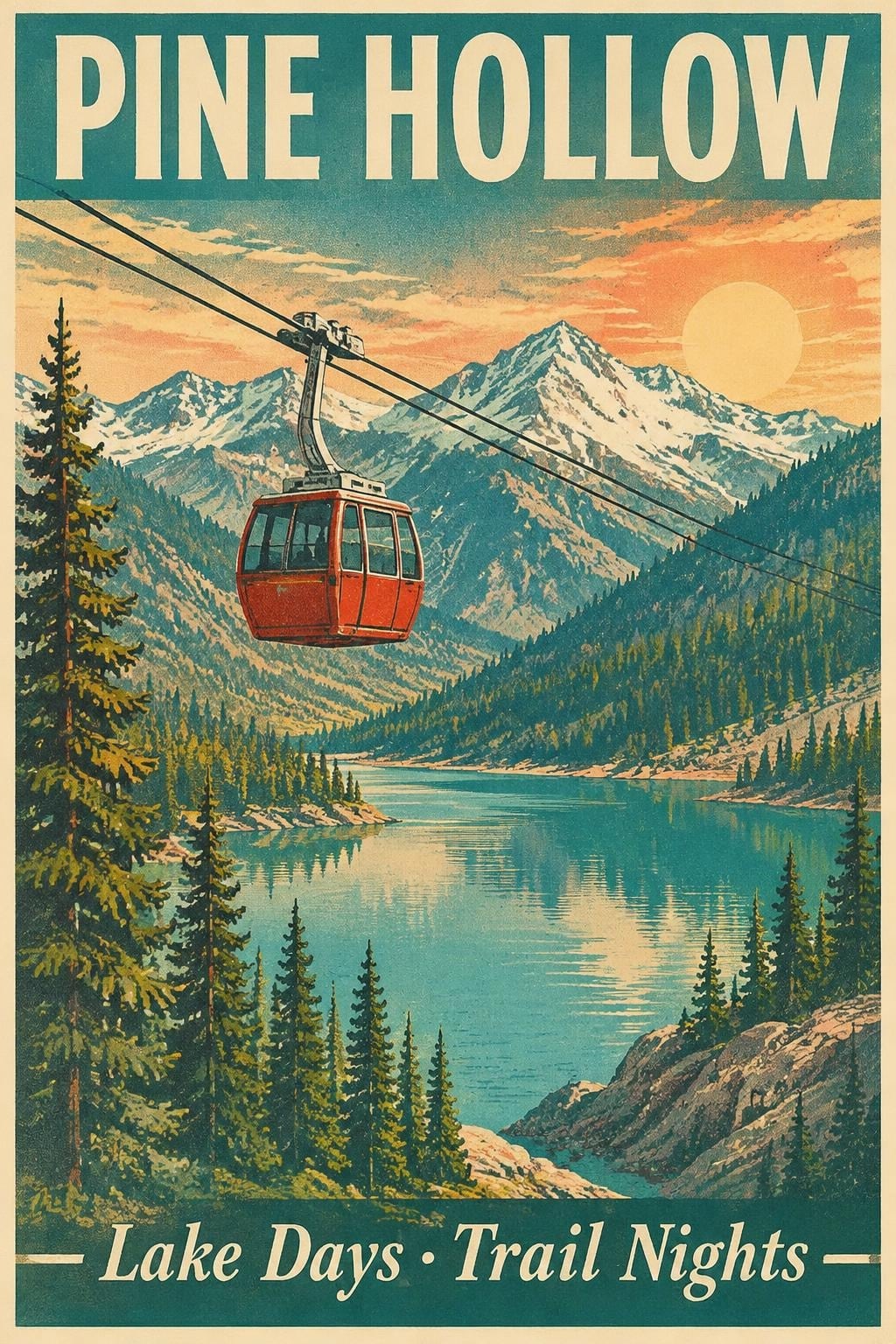
Posters are what OpenAI suggests Flare for, so we started there. Same prompt, medium quality, 1024×1536, default complexity:
A vintage-style travel poster for a fictional mountain town called Pine Hollow. Bold headline ‘PINE HOLLOW’ across the top. A red cable car crossing a turquoise lake valley at golden hour, pine forests and snowy peaks behind. Subhead at the bottom: ‘Lake Days · Trail Nights’. Flat screen-print look, teal, coral and cream palette, subtle paper grain.
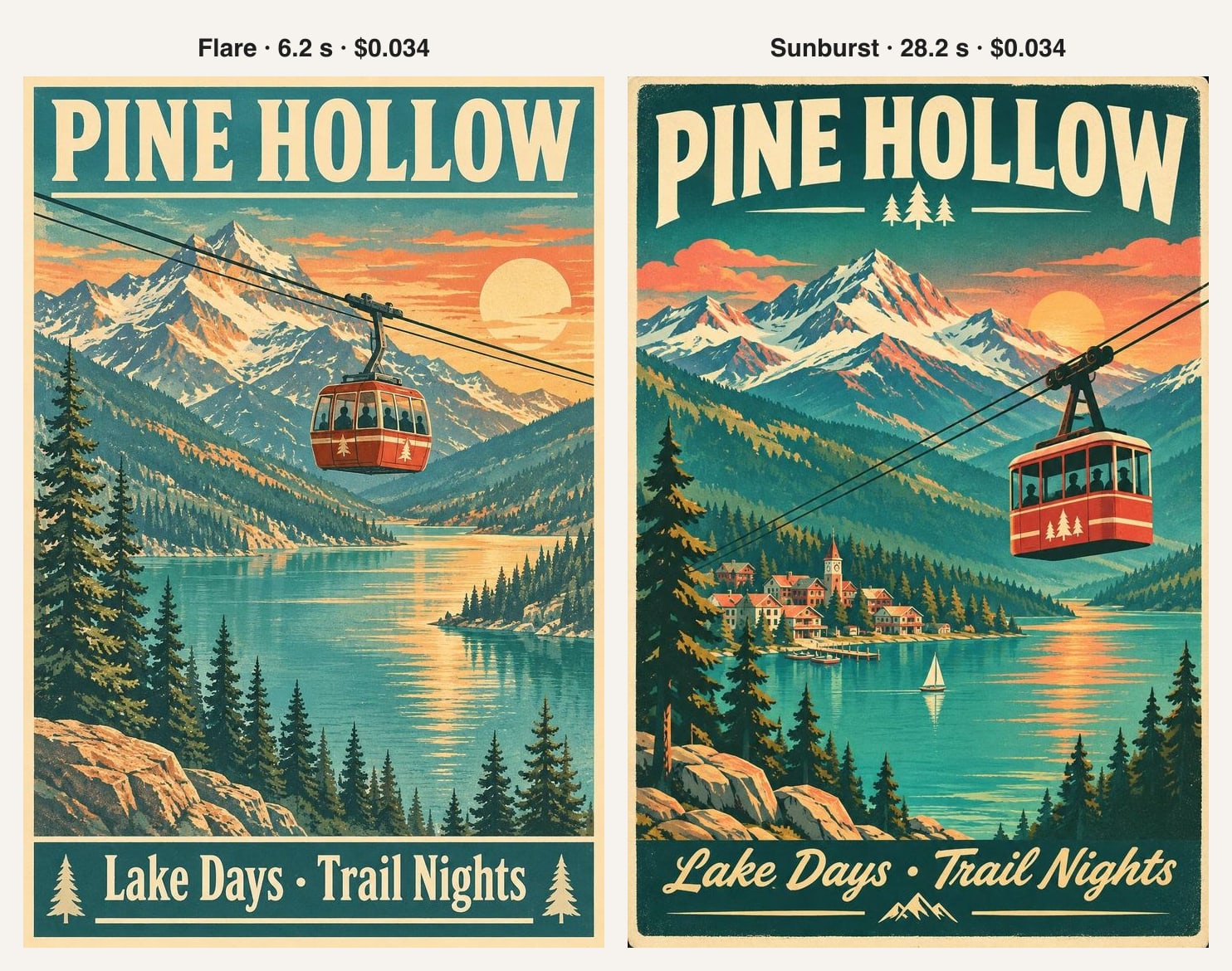
Both models spelled PINE HOLLOW and Lake Days · Trail Nights correctly. The difference is in how much they add. Sunburst put in things we didn’t ask for: a lakeside village with a clock tower, a sailboat, small pine icons under the headline and a script font for the subhead. Flare stayed closer to the brief, with a simple frame and a plain subhead. Neither one is wrong. If you want the model to decorate, Sunburst does more of it. Over three runs of this prompt, Flare took 6.2–7.0 seconds and Sunburst 24.5–28.2 seconds.
Test 2: an infographic full of text
Dense text is where image models usually fail, and it is what OpenAI suggests Sunburst for. We asked for a six-plant watering cheat sheet with a title, six names, six watering intervals in a set order and a footer: fourteen pieces of text.
A clean infographic titled ‘Houseplant Watering Cheat Sheet’. A 2 by 3 grid of six plants: Snake Plant, Pothos, Monstera, Fiddle Leaf Fig, Peace Lily, Cactus. Each cell has a small flat illustration of the plant, its name, a watering line (‘Every 2–3 weeks’, ‘Every 1–2 weeks’, ‘Every week’, ‘Every 1–2 weeks’, ‘Twice a week’, ‘Every 3–4 weeks’ in that order) and one to three water-drop icons. Footer text: ‘Check the top inch of soil first.’ Flat vector style, sage green and off-white, crisp readable sans-serif text.
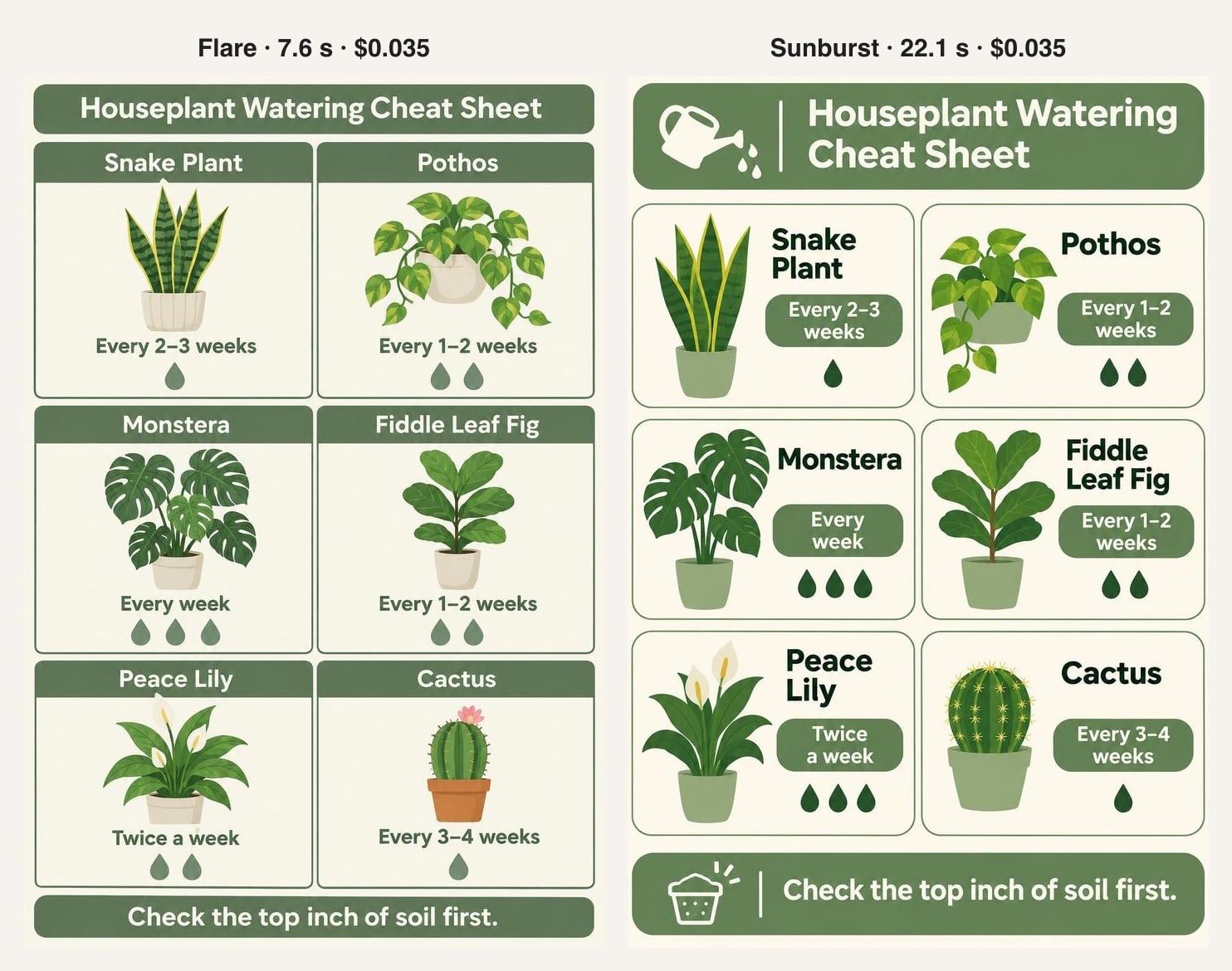
Both got all fourteen pieces of text right, in the right order. We didn’t expect that from the faster model. Sunburst’s version is the more finished design: a watering-can icon in the header, the intervals in label pills and an icon in the footer. Its drop counts also follow the watering intervals better. Flare gave the peace lily (twice a week) fewer drops than the monstera (every week); Sunburst gave both three. If the image has to make sense as well as look good, Sunburst is the safer choice.
The setting that halves Sunburst’s time: complexity
OpenAI’s guide says complexity controls “how much the image model plans before rendering”. Low suits focused edits. High helps with dense text and complex layouts, but “can increase latency”. If you don’t send the setting, both models use high, so most apps run at high without knowing it.
We ran the poster prompt three times on each model at each setting, all at medium quality:
| Model | Default (high) | Low complexity | Median change |
|---|---|---|---|
| Flare | 6.2, 6.5, 7.0 s | 10.9, 7.2, 6.8 s | 6.5 → 7.2 s |
| Sunburst | 28.2, 24.5, 27.4 s | 12.9, 14.4, 13.0 s | 27.4 → 13.0 s |
For Sunburst, low complexity cut the median time from 27.4 to 13.0 seconds. For Flare it made no difference, or made it slightly slower, so Flare is already planning very little at the default. The cost didn’t change: every one of these images used 1,132 output tokens.
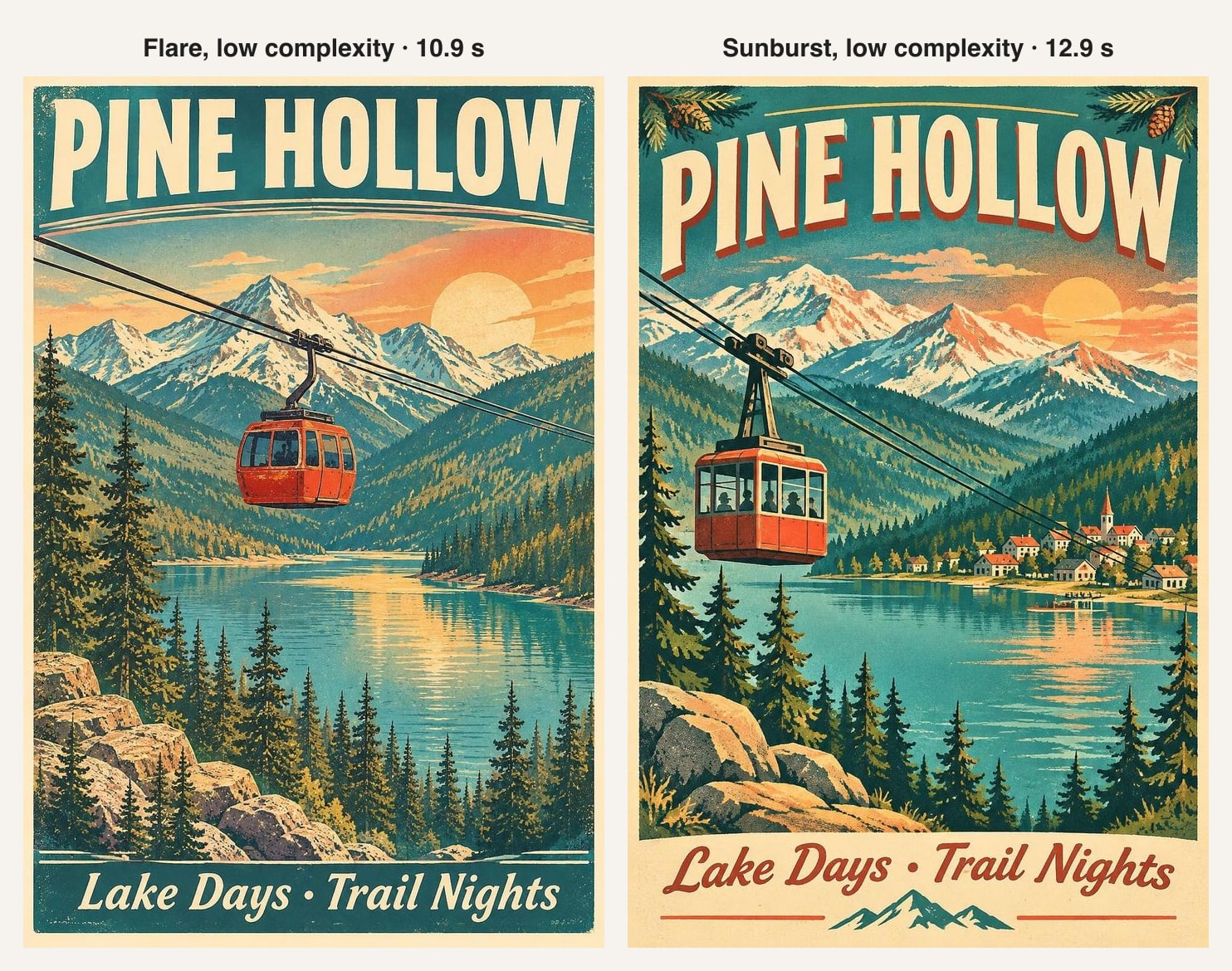
The posters lost very little. Sunburst still added a village and pine cones at the corners, and the text was still correct. On a prompt like this, low complexity gives you Sunburst’s look in about half the time. On an infographic or a crowded scene we would keep it at high, since that is the case OpenAI says high is for.
Is Flare really six seconds?
Yes, and a little faster. OpenAI’s “as little as six seconds” is for low quality. With quality and complexity both set to low, Flare made the same poster in 4.5–4.5 seconds in all three runs, for $0.020 an image.
The low-quality draft is softer when you zoom in, but the layout, colors and text are all there. That makes it a cheap way to try ten ideas before you pay for one at a higher quality.
GPT Image 2.6 pricing: what one image costs
OpenAI charges both models by the token, at the same rates as GPT Image 2 and 2.5:
| Token type | Price per 1M tokens | Cached |
|---|---|---|
| Text input (your prompt) | $5 | $1.25 |
| Image input (photos you upload to edit) | $8 | $2 |
| Image output (the picture) | $30 |
The image output is almost the whole bill. Here is what our images cost, from the token counts in each API response:
| Image | Model | Output tokens | Cost |
|---|---|---|---|
| Low quality, 1024×1536 | Flare | 664 | $0.020 |
| Medium, 1024×1536 | Flare or Sunburst | 1,132 | $0.034 |
| Medium, 1536×1024 | Flare | 1,132 | $0.034 |
| Medium, 1024×1024 | Flare | 1,449 | $0.044 |
| High, 1536×1024 | Sunburst | 1,372 | $0.042 |
| Edit of a 1024×1024 photo, medium | Flare | 1,449 (plus 1,024 image input) | $0.052 |
So a GPT Image 2.6 image cost us between two and five cents. A prompt of a few dozen words adds less than a tenth of a cent. Two things surprised us: the square image used more tokens than the portrait one at the same quality, and high quality cost only a little more than medium. The Batch API, which is cheaper for earlier models, is not supported for 2.6. All 23 images we made for this article cost $0.78 in total.
How to use Flare and Sunburst
In ChatGPT
ChatGPT Images 2.6 is on every ChatGPT plan on the web, desktop and mobile. Ask for an image in the chat. For the free options, see how to use GPT Image 2 for free.
In the OpenAI API
Send the model ID to the generations endpoint. This is the request we used for the low-complexity tests:
curl https://api.openai.com/v1/images/generations \
  -H "Authorization: Bearer $OPENAI_API_KEY" \
  -H "Content-Type: application/json" \
  -d '{
    "model": "gpt-image-2.6-sunburst",
    "prompt": "A vintage-style travel poster for a fictional mountain town called Pine Hollow...",
    "size": "1024x1536",
    "quality": "medium",
    "complexity": "low",
    "output_format": "jpeg"
  }'
The image comes back as base64 in data[0].b64_json. OpenAI says you may need to complete API Organization Verification in the developer console before you can use the GPT Image models.
On Pop-cam, without an API key
The GPT Image 2.6 generator on Pop-cam lets you pick Flare or Sunburst, choose square, portrait or landscape and low, medium or high quality, and edit a photo you upload. Each image costs 1 credit at any setting, and a new account gets 2 free credits.
FAQ
Which is better, GPT Image 2.6 Flare or Sunburst?
Neither is better at everything. Flare is about four times faster and was just as accurate on text in our tests, so it is the better default. Sunburst makes more detailed designs and is the one OpenAI recommends for dense layouts and precise edits.
How much does GPT Image 2.6 cost?
$30 per million image output tokens, $8 per million image input tokens and $5 per million text input tokens, the same for both models. In our tests that was $0.020 for a low-quality image and $0.034 to $0.052 for medium, high and edits.
Is GPT Image 2.6 faster than GPT Image 2.5?
OpenAI says up to 50% faster. We didn’t time 2.5 ourselves, so we can’t confirm the figure, but Flare’s six-second claim held up: 4.5 seconds at low quality.
Is GPT Image 2.6 in ChatGPT?
Yes. OpenAI released it in ChatGPT as ChatGPT Images 2.6 on all plans, and in Codex.
Can GPT Image 2.6 make GIFs and SVGs?
Yes, through the API’s generations endpoint, on both models. A GIF has 2 to 64 frames. The edit endpoint can’t return a GIF.
Does complexity change the price?
No. OpenAI says complexity has no separate fee, and our images used the same number of tokens at low and high complexity.
Sources
- OpenAI: Image generation guide
- OpenAI: GPT-Image-2.6 Flare model page
- OpenAI: GPT-Image-2.6 Sunburst model page
- OpenAI on X: the Images 2.6 launch post
- FoneArena: OpenAI rolls out Images 2.6
- OrcaRouter: OpenAI Images 2.6, GIFs and two API models
- Our own tests: 23 images made through the OpenAI Images API on November 5, 2026, timed from request to response, costs from the token counts in each response.