 By fengcainiao
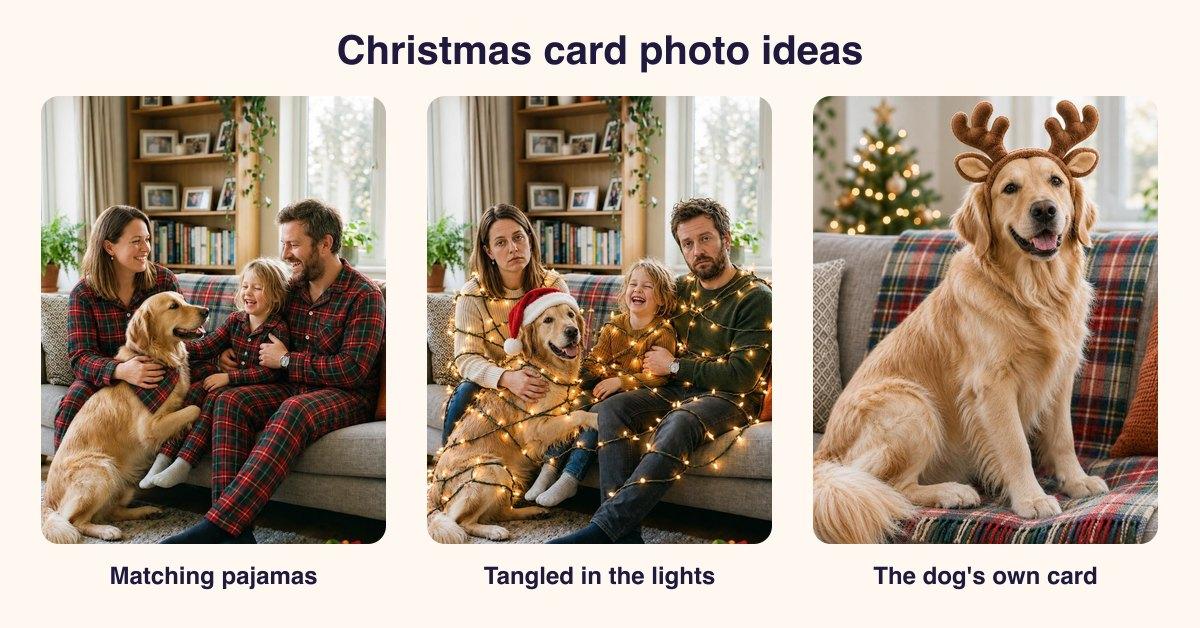
Christmas card photo ideas don’t need a studio: matching pajamas by the tree, cookie baking in the kitchen, everyone on the front step, or the dog in reindeer antlers. A phone on a timer and a window are enough.
The hard part is getting everyone into one frame. So the 21 ideas below are sorted by who can be in the photo, and they share one rule: faces first, theme second. If there is no time for a shoot at all, Koosu’s AI Christmas Card builds a card from a photo you already have (Koosu is the new name of Pop-cam).
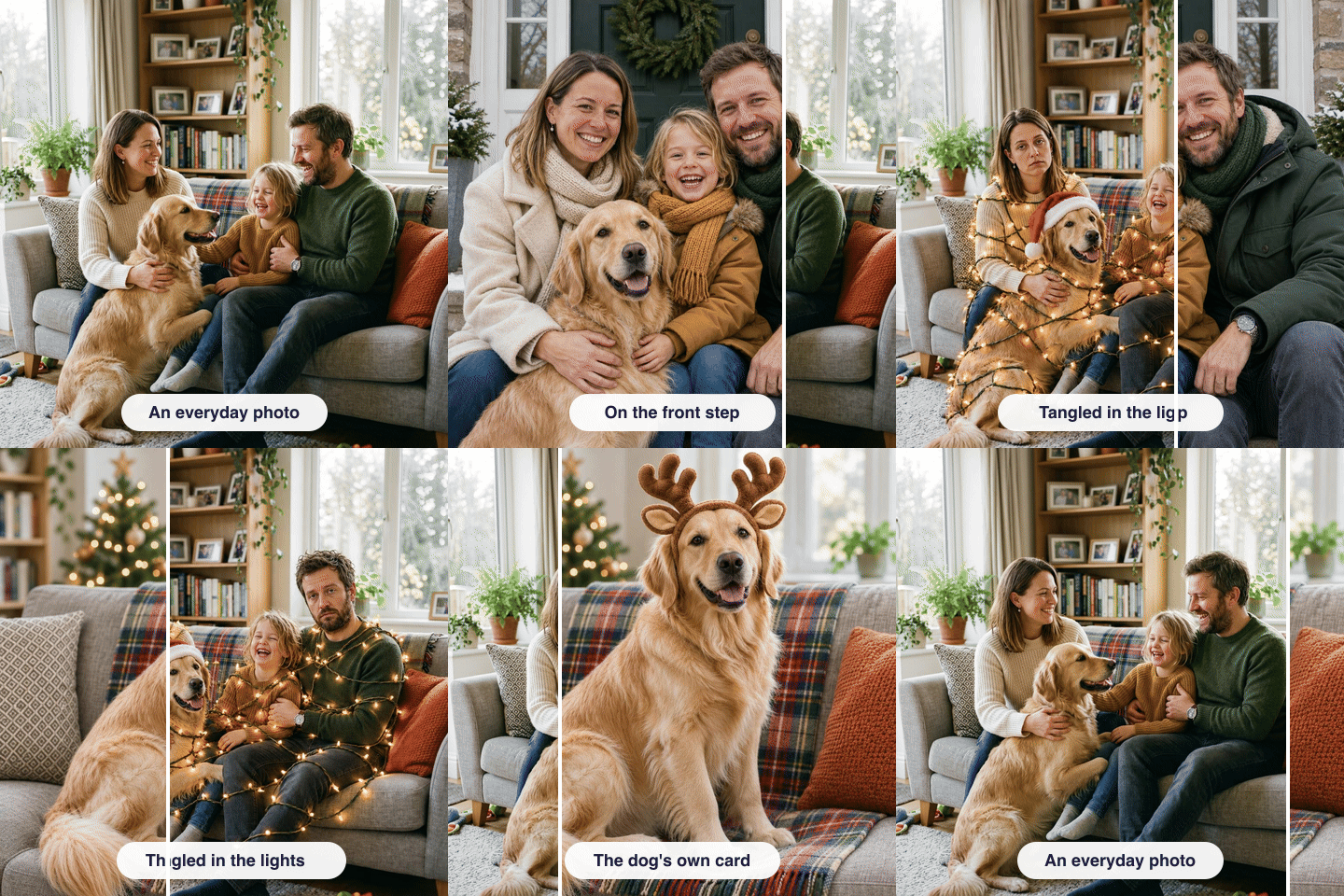
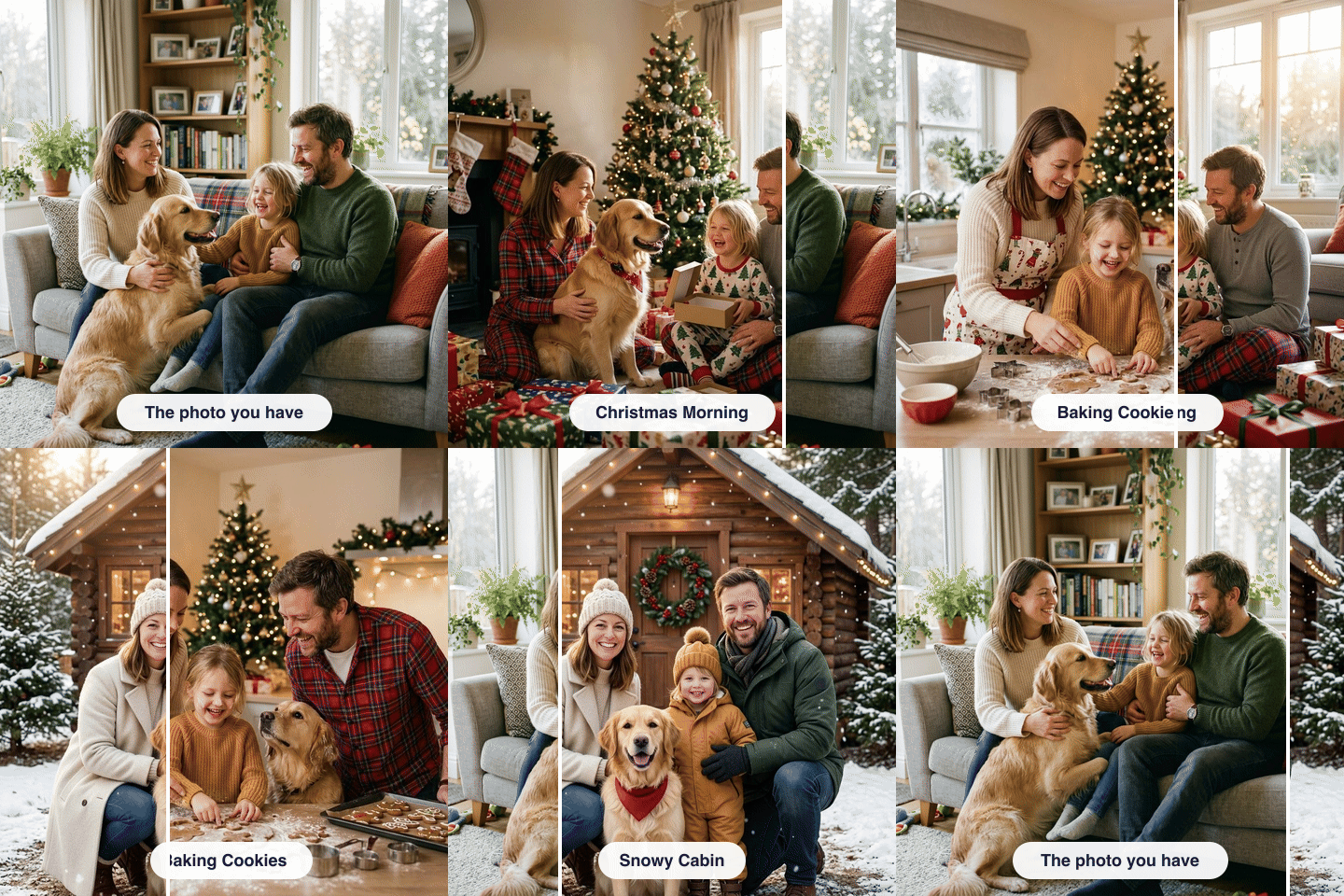
The first two animations in this article were made from one sample photo with GPT Image 2.6 Sunburst, one of the image models on Koosu. The family in them is AI-generated. The card and scene examples further down were made with Koosu’s own Christmas tools.
What Makes a Good Christmas Card Photo
Ask the people who receive the cards. In a Reddit thread about photo cards, one reply reads: “I love it. I love seeing my people. 🙂 and their pets.” Another would “rather see their family and how their kids have grown” than a generic card.
Hallmark’s photographers say the same from behind the camera. Keep clothing simple, because “You want the people in the picture to shine”. Don’t back up to fit the whole tree, or the family gets lost. So every idea here has to pass three checks:
- Everyone is in it, pets included.
- Every face is easy to see at the size of a printed card.
- Everyone looks like themselves.
| Your situation | Start with | What you need |
|---|---|---|
| Everyone is home and willing | Matching pajamas by the tree (idea 1) | A phone on a timer, a window |
| Small kids who won’t sit still | Cookie baking (idea 2) | An activity and burst mode |
| You can’t get everyone in one shot | Separate photos on one card (idea 7) | The same spot and the same light |
| Someone lives far away | The stand-in on a stick (idea 9) | One emailed photo |
| The pet is the star | The pet-only card (idea 19) | Treats and a helper |
| No time for a shoot | A card made from a photo you already have | One photo where every face is visible |
Christmas Card Photo Shoot Ideas at Home
- Matching pajamas by the tree. Sit on the floor in front of the tree, close together. Hallmark calls matching pajamas “a great visual way to signal ‘family!'”. Shoot by day with the tree lights plugged in. The tree is a backdrop, and you don’t need all of it in the frame.
- Baking cookies. Give the kids dough and cookie cutters, and shoot while they work. Postable’s card blog says an activity makes the shoot easier for everyone, “especially the kids”. Do it by day, near a window.
- Decorating the tree. One person hangs an ornament and the others watch. Photographer Susana Bodamer of focalfun.com explains why: hands are busy, so expressions relax.
- The front step. Hang a wreath on the door and gather everyone on the top step. Hallmark’s reason: “You get outdoor light but it’s close to inside”. Stand in shade, and never face the sun.
- The stairs. Hallmark calls stairs “an easy way to group lots of folks in a small space and still see everyone in the shot”.
- The box grid. Each person poses alone inside the same cardboard box, in the same light, and the photos go into one grid. It also works when not everyone can be there on the same day.
How to shoot any of them. Prop the phone up, use the 10-second timer, stand near a window and switch off the overhead lights. Hallmark’s rule for how many frames: “at least twice as many photos as there are people in your photo”. If a laundry basket got into the best frame, Remove Objects From Photos takes it out.
Once you have the photo, put it in a card as it is. Koosu’s Christmas card frames take your own photo and your greeting, and no AI changes the picture. Making and downloading the card is free. A hosted page to share it by link is part of the Basic and Pro plans.
Family Christmas Card Photo Ideas for When Not Everyone Is in the Room
These five are for the families that the group shot does not fit.
- Separate photos, one card. A parent of three on Reddit’s r/daddit: “I usually use separate pics of the kids, since it’s impossible to get my three to pose together at the same time.” Use the same spot and light for each child.
- The year in a collage. Hallmark suggests the happiest moments of the past year in one collage: Halloween costumes, sports, school performances. Nobody has to pose in December.
- The stand-in on a stick. A parent on r/Parenting asked how to include a son who had moved to another state. One reply: their brother emailed a photo of himself in a Santa hat. They glued the cut-out head to cardboard on a stick and held it up in the family photo. “People seemed to get a kick out of that.”
- Backs to the camera. Everyone faces away from the camera, toward the tree or the view. Postable calls it “ideal for families that don’t particularly love being in front of the camera”. It fails the second check, so put a small face photo on the back.
- Casual clumps. With three generations, don’t line people up. Hallmark’s photographers put the oldest generation in the middle and let people sit on chair arms, hug and overlap.
Christmas Card Ideas for Couples
- Wrapped in lights. One string of Christmas lights around both of you. Postable’s note: plug them in, so the colors glow.
- One blanket, one mug. Bodamer’s sequence for couples is a short walk, then one shared blanket and one mug of cocoa.
Funny Christmas Card Photo Ideas
A funny card needs one joke. Bodamer’s rule: “Pick one clear idea instead of several.” And don’t worry about dignity. One commenter in the photo-card thread above: “I think they’re supposed to be cringe. That’s part of the fun.”
- Tangled in the lights. Hallmark’s example is the kids tangled up in Christmas lights. Add deadpan parents, and drape the lights loosely.
- Opposite moods. Another of Bodamer’s: stand back to back. One of you grins as widely as possible. The other crosses their arms and looks done with the whole thing.
- See no evil, hear no evil, speak no evil. The same parent of three: three is “the perfect number” for it.
- Recreate an old holiday photo. Copy the pose and the outfits from a childhood photo and print the two side by side. If the old print is faded, Old Photo Restoration cleans it up first.
- The outtake. Take a burst and keep the frame where it all goes wrong: the blink, the escape, the dog leaving.
Before you scan that old print, read how to restore old photos without changing the faces.
Christmas Card Photo Ideas With Dogs (and Cats)
- The pet-only card. Postable calls it “a no-humans approach”: the pet, an ornament and some sparkle behind. Sign the card from the pet.
- Antlers or a Santa hat. Hallmark’s photographers say to leave the costume around the house for several days before the shoot, so the pet is used to it.
- Matching sweaters. Put the dog in a small Christmas sweater that matches yours. You pose stiffly, like a formal portrait. The dog will not, and that is the joke.
Three things make pet photos easier. Hold the treat right behind the camera, level with the lens, so the pet’s eyes stay level. Recruit a helper. And allow time: Hallmark says at least half an hour, and warns that with cats “you may have to pick them up and put them back 75 times”. Bodamer photographs cats when they are calm, on a throw in their favorite spot.
Christmas Card Photo Outfit Ideas
Clothes are where the theme can beat the faces. The photographers’ advice fits in four lines:
- Solid colors and subtle patterns. Hallmark suggests rich browns, dark blues, deep reds and evergreens.
- One feature color, two neutrals. Bodamer’s formula for families, for example burgundy with beige and olive. It looks coordinated without being identical.
- No logos or metallic fabrics. They catch too much light.
- No white outdoors in winter. Hallmark’s photographers say that against a white landscape it can wash out skin tones.
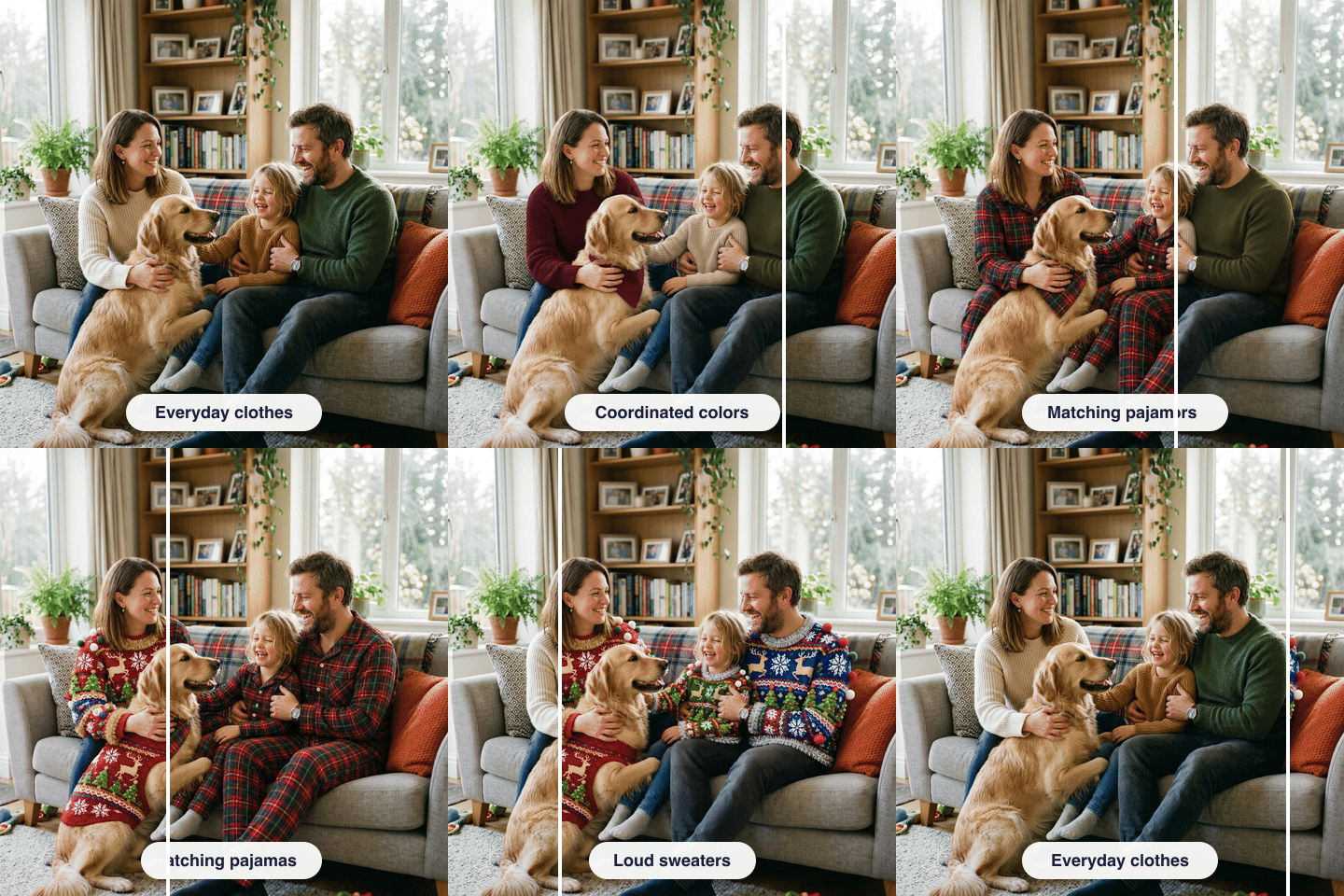
Matching pajamas and loud sweaters break the first line on purpose. They work because everyone breaks it together. For the plain-color logic in more detail, see our guide to what to wear for a headshot.
No Time for a Photo Shoot? Make the Card From a Photo You Already Have
The photo from the summer barbecue has everyone in it, and nothing about it says Christmas. An AI card maker keeps the people and changes the scene around them.
- Pick the photo. Choose one where everyone faces the camera and no face is tiny. Include the pet in the photo if you want it on the card.
- Upload it to the AI Christmas Card maker and choose one of six styles: Cozy Fireplace, Snowy Watercolor, Vintage Postcard, Modern Minimal, Storybook or Ugly Sweater.
- Type the greeting, for example “Merry Christmas from the Lees”. Short greetings come out cleanest.
- Check every face against the original, then download. The portrait image prints as a 5×7 card with a slight trim, or goes out by email or text.
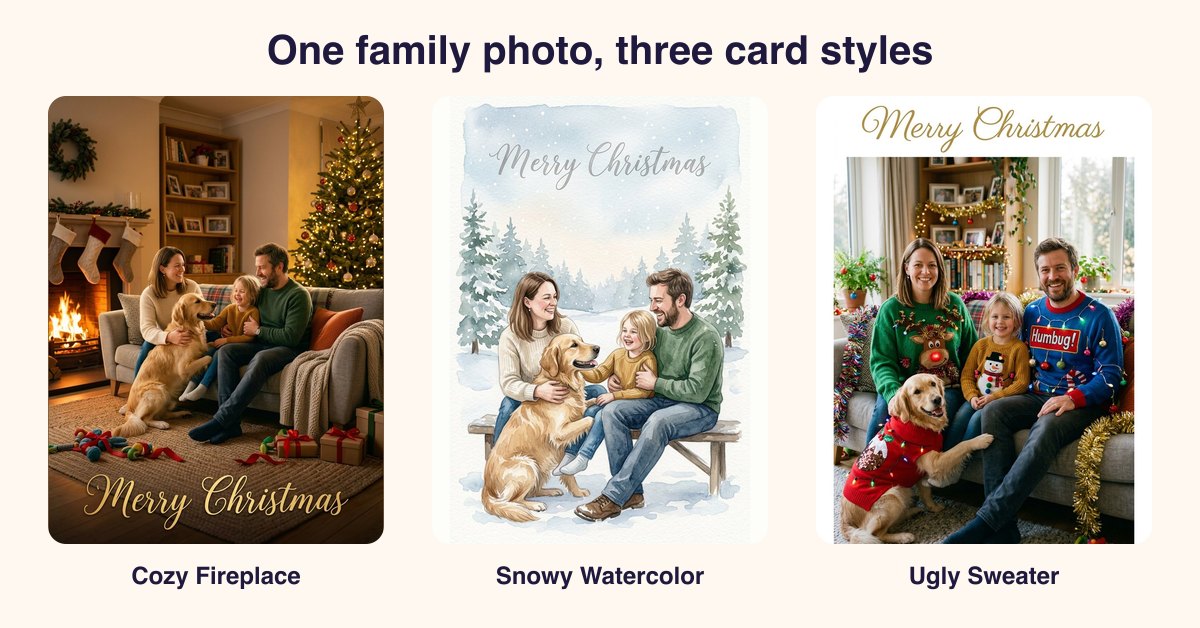
2 generations are free without an account. A free result carries a small Koosu mark in one corner, and downloading needs a free account. A card paid with a credit has no mark.
Ordering from a card company instead? Then you need a photo with no lettering. AI Christmas Photos puts the same people in one of eight scenes, such as Christmas Morning or Snowy Cabin. Both are among Koosu’s free holiday photo tools.
What an AI Christmas Card Can and Can’t Do
- It can put the people from one photo into a Christmas scene and letter your greeting on it.
- It can change a face. The third check matters most here. In a Reddit request to add a cat to a card photo, one commenter wrote of an edit they took for AI: “The couple, dog and environment/background all look odd.” Compare every face with the original before you print.
- It can change a pet. Another commenter asked one editor, “Why did you change the dog’s heterochromia eyes?”, and called changing key features of a dog’s look “what AI does”. Check the eyes and the markings.
- Big groups are harder. Koosu’s own tip for AI Christmas Photos: up to five or six people works best.
- It is a made picture, and no record of a real day. Some people don’t want AI in their photos: that request was titled “No AI Please!”. Ask the people in the photo first.
The animations on this page show the same limit. Where only the clothes change, the faces stay exact. In the front-step frame the family was redrawn from a new angle, and the faces are close without being identical.
When to Take the Photo and Mail the Cards
For 2026, USPS recommends sending First-Class Mail by Thursday, December 17 for expected delivery before December 25 in the lower 48 states. The date is recommended, not guaranteed.
Printed cards need time before that, so check your printer’s order cut-off. In practice, take the photo by the first days of December.
Running late? A card image can go out by email or text the day you make it. A New Year card is a fine plan B, and Koosu’s New Year Card Maker is for that.
The full calendar for this year, from the photo to the mailbox, is in our guide to when to send Christmas cards.
FAQs
What are some creative at-home photo ideas for Christmas cards?
Matching pajamas by the tree, cookie baking, decorating the tree, the front step, the stairs and the cardboard-box grid. Each needs only a phone on a timer and window light. To see your family in a scene before you set it up, try AI Christmas Photos.
How to make Christmas cards with photos free?
Koosu’s AI Christmas Card gives you 2 free generations from your own photo without an account. A free card carries a small Koosu mark, and downloading it needs a free account.
How to take dog Christmas photos?
Let the dog get used to the costume for a few days first. Then hold a treat right behind the camera, have a helper steer, and allow at least half an hour.
What are some beautiful Christmas card ideas for adults?
For a couple: a string of lights around both of you, or one blanket and one mug. With a pet and no kids: the pet-only card.
What is the best message for a Christmas card?
A short one with your names in it, such as “Merry Christmas from the Lees”. For a pet card, try “Happy Howlidays” or “Meowy Christmas”.
For the card before this one, see our Thanksgiving card messages: 30 short examples and a three-line formula for writing your own.
Pick One Idea This Week
Choose the row of the table that fits your household and take twice as many frames as there are people. If the shoot doesn’t happen, the photo you already have will do.