 By fengcainiao
How to remove text from a picture: if the text sits along an edge, crop it off. If you still have a copy without the text, use that. Otherwise, erase it with a tool that rebuilds what was behind the letters, such as your phone’s photo editor, Photoshop’s Remove tool or Koosu’s AI Text Remover, and then compare the result with the original at full size.
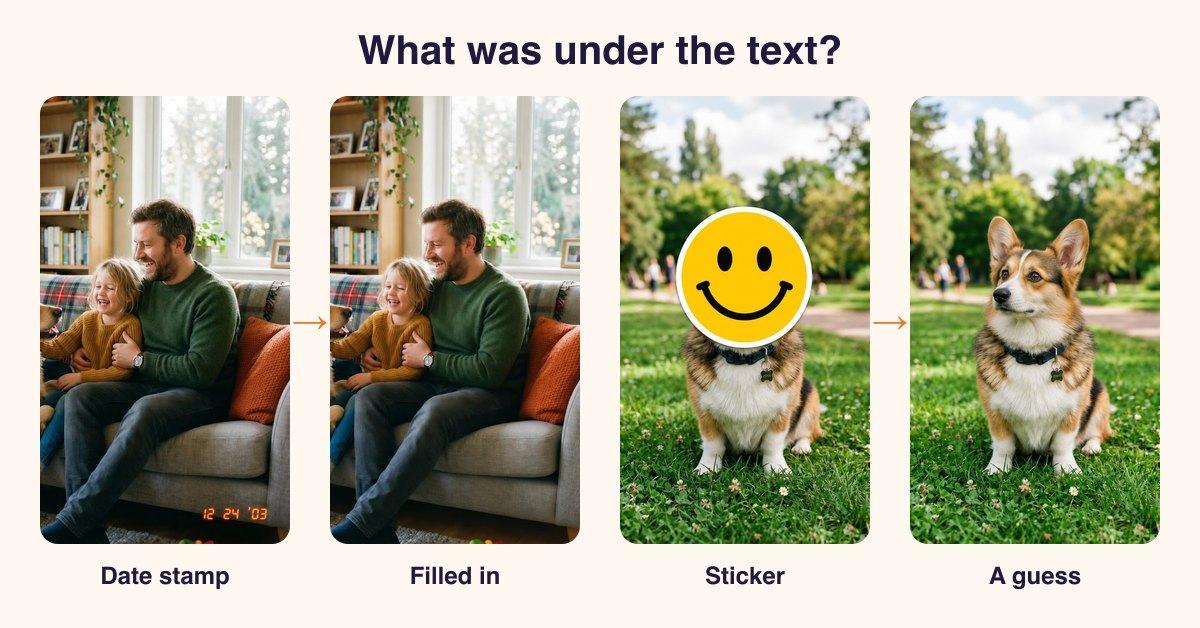
The same steps answer how to remove text from an image of any kind: a screenshot, a vacation photo with a story caption, an old print with an orange date in the corner. One thing is true for all of them, and the guides we read skip it. Removing text is a repair, not an undo. The part of the picture under the letters was never saved in the file, so the tool paints a likely version of it. On sky or a rug, nobody can tell. On a face or on other text, the guess can be wrong.

The animations in this guide were made with GPT Image 2.6 Sunburst, one of the image models on Koosu.
Before You Erase: Crop It or Find the Original
The cleanest way to remove words from a picture is to not erase them at all. Three checks come first:
- Is the text at an edge? Crop it. When someone asked in r/photography how to remove a date stamp, one reply was simply “Can you just crop it out?” You lose a strip of the picture, but nothing in it is invented.
- Is there a copy without the text? If you added the caption yourself, find the photo you started from. If the image was made in an editor and you kept the file, the text may still be on its own layer: hide it and export again. An Adobe community expert put the hard case plainly: text on top of the image that is not on a separate layer “may be difficult, if not impossible to remove it without damaging the image.”
- Is the text part of the scene? A shop sign or a T-shirt print is not an overlay; it is in the photo. Erasing it changes what the photo shows. You can describe it in the note of the AI Text Remover, or take the whole object out with Koosu’s AI Object Remover.
If you do erase, look first at what is under the text. Plain or repeating areas such as sky, water, grass, a wall or a rug are easy to rebuild. Large letters over a busy background are harder: Koosu’s own tool page calls that “the hardest case” and suggests running it again if a trace remains. Faces, hands and other text are where the tool has to invent the most, so treat what comes back as a new picture.
How to Erase Text From a Picture in 4 Steps
In Koosu it takes four steps, with no brushing or masking:
- Upload. Open Koosu’s AI Text Remover and upload the largest copy of the picture you have: a photo, a screenshot or a scanned print, as PNG, JPEG or WEBP. Small, heavily compressed images give the model less to rebuild from.
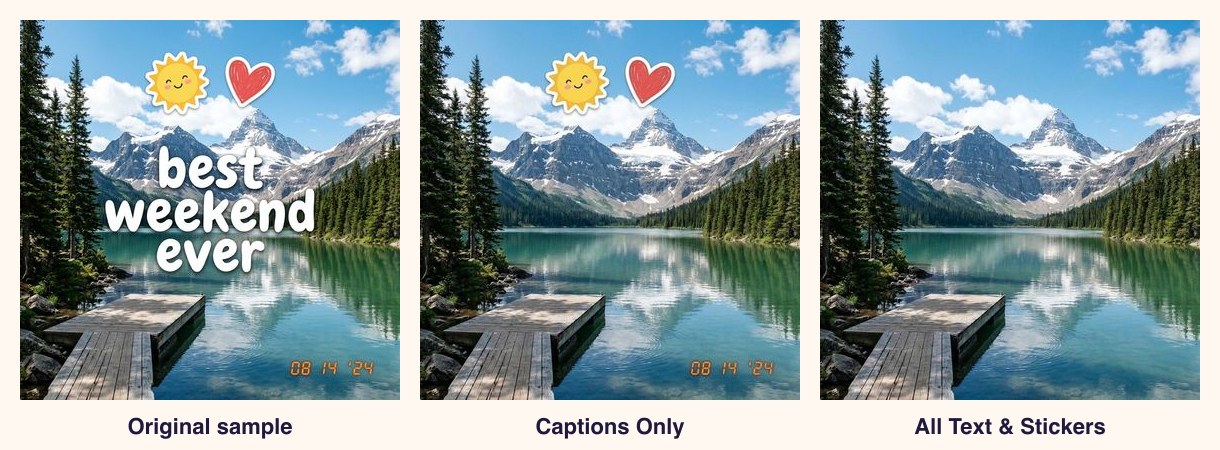
- Choose what goes. All Text & Stickers, Captions Only, Date Stamp Only, or Stickers & Emoji. To keep some of the text, say which in the note, for example “only the white text at the bottom”.
- Remove it. The model (Google’s Nano Banana 2) removes what you chose and paints in what was likely behind it. It is told to change nothing else and to leave logos, watermarks and copyright notices as they are.
- Check, then download. Compare the result with your original at full size (see the next section). If a trace of the letters is left, run it again on the result.
Signed out, you get 2 free generations to try it; downloading a result needs a free account. An account without credits gets 2 free generations a week, and a free result carries a small Koosu mark. With credits, each image costs 1 credit and has no mark.
Remove Text From an Image Without Affecting the Background
A text remover gives you back a new image, not a patch on your file, so “is the text gone?” is only the first question. A request on r/PhotoshopRequest sums up the risk in its title: “Tried chat gpt but it changed the image too much.” We saw it ourselves while making the date-stamp example below with GPT Image 2.6 Sunburst: the first try also redrew the man’s jeans next to the stamp, the second left them alone. Before you share or print the result, open both versions side by side and check:
- Where the text was: no ghost letters, no smudge, no blurry patch, and lines such as a horizon, a railing or a table edge that run straight through.
- Faces and hands anywhere in the picture: the same expression, the same fingers, the same eyes.
- Text you wanted to keep: a sign, a jersey number, a label.
- The edges: the framing should match the original, with nothing cropped or added.
If something changed, run it again, narrow the job with an “only” setting, or crop. Keep the original.
If you would rather replace the whole background with plain white, for a listing or a headshot, see how to change a photo background to white and which white each use needs.
How to Remove a Date Stamp From a Photo
An orange date in the corner was printed onto the photo by the camera, so it is part of the picture. You have two choices, and the animation shows both: crop it off and lose the bottom of the picture, or fill it in.

To remove a timestamp from a photo and keep the whole frame, pick Date Stamp Only in the AI Text Remover. It removes the camera date and keeps every other overlay, such as a caption you want to keep. A small stamp over a plain area is the easy case.
In Photoshop, one reply in that r/photography thread suggests the Healing Brush and Clone Stamp, and another says Generative Fill “would do this in 10 seconds”. For a batch, plan real time: in a thread about removing date stamps in bulk, one user did them “image by image” in a Photoshop trial and reported, “It took me probably 2 hours.”
If the photo is a scan of an old print that is also scratched or faded, run it through Old Photo Restoration too. Our guide on how to restore old photos covers scanning the print and checking the faces afterwards.
How to Remove an Emoji From a Picture
To take an emoji or a sticker off your own photo, use the AI Text Remover’s Stickers & Emoji setting: it removes the added graphics and keeps the text. All Text & Stickers removes both.
What you get under the sticker depends on what it covered. A heart over the sky comes off clean. An emoji over a face is different, because the face was never in the file. Google’s AI summary for “how to remove emoji from picture” says it directly: hidden details are guessed. Some emoji removers promise to “recover” facial features. They draw a believable face instead, like the two at the top of this guide.
Use it on your own photos. A sticker over someone’s face is often there for privacy, and the face you get back is invented, not that person.
On Your Phone or in Photoshop
For a few small words you may not need a web tool. These are made for “distracting objects”, not text, but each one erases what you brush over.
On iPhone: Clean Up
Open the photo in Photos, tap the Edit button, tap Tools, then Clean Up, and tap, brush or circle the text (Apple’s guide). It needs an Apple Intelligence iPhone: an iPhone 15 Pro, iPhone 15 Pro Max or an iPhone 16 model or later, and it is not available in every language or region. To undo it after saving, open the edit again and tap Reset.
On Android or iPhone: Magic Eraser in Google Photos
A Google post from July 2024 says Magic Eraser is available to all Google Photos users with no subscription, on devices with at least 3 GB of RAM and Android 8.0 or iOS 15 or higher (Google’s post). Google’s own advice is that it “works best for quick fixes on smaller portions of the photo”, which fits a short caption better than a big title.
In Photoshop: the Remove Tool
The Remove tool sits under the Spot Healing Brush. Set the brush slightly larger than the letters, then brush over them or loop around them; for long or complicated text, turn off “Remove after each stroke” and paint several strokes before it fills (Adobe’s help page). Adobe says the Remove tool does not use generative credits. For full control, the Clone Stamp still works: one tip in the bulk thread is to set its hardness to 0% and sample a spot of similar brightness and color.
Which method fits your picture:
| Method | Best for | The catch |
|---|---|---|
| Crop | Text along an edge | You lose that strip of the picture |
| The original file or text layer | Text you added yourself | Only if you kept the file |
| Clean Up (iPhone) or Magic Eraser | A few small words on a plain area | Needs a supported phone; made for objects, so you brush each word |
| Photoshop Remove tool or Clone Stamp | Precise work and text over detail | Needs Photoshop and time for every photo |
| Koosu’s AI Text Remover | Captions, date stamps and stickers, with no brushing | Free tries, then credits; free results carry a small mark; it leaves watermarks alone |
Text That Is Not Yours to Remove
The AI Text Remover is told to leave logos, watermarks and copyright notices as they are, on purpose. A credit line or a © notice on someone else’s photo is the kind of information the law protects. In the US, 17 U.S.C. § 1202 says no person shall, without the authority of the copyright owner or the law, “intentionally remove or alter any copyright management information”, and it counts the author’s name and the copyright notice as that information. The section also turns on knowing that the removal helps infringement. That is the text of the law, not legal advice.
It comes up on photo-editing request boards. In one r/PhotoshopRequest thread, someone asked for the writing to be removed from a photo; another member objected that it was a photographer’s work and replied: “Why would you help somebody steal work from a photographer? Not cool at all.” If you need a clean copy of someone else’s image, ask the owner or buy a license.
FAQ
How can I remove text from an image?
Crop it if it is at the edge, or use a copy without the text. Otherwise erase it with Clean Up, Magic Eraser, Photoshop’s Remove tool or an AI text remover, and compare the result with the original.
How to remove text on photo in iPhone?
On an iPhone with Apple Intelligence (iPhone 15 Pro or later), use Clean Up in Photos and brush over the text. On other iPhones, use Magic Eraser in the Google Photos app or a web tool.
Is Google Magic Eraser free?
Yes. A Google post from July 2024 says Magic Eraser is available to all Google Photos users without a subscription, on devices with at least 3 GB of RAM and Android 8.0 or iOS 15 or higher. Google adds that feature availability varies by device.
Can I remove an emoji from a picture?
Yes, from your own photo: brush over it in a phone editor, or pick Stickers & Emoji in Koosu’s AI Text Remover. Whatever was under the emoji is painted in, not recovered, so a covered face comes back as a believable face, not the real one.
How do I remove a time stamp?
Crop it off if you can spare the edge. To keep the whole picture, fill it in with Date Stamp Only in Koosu’s AI Text Remover or Photoshop’s Remove tool, then check the corner at full size.
Can you legally remove a watermark from a photo?
From your own photo, yes. From someone else’s, US law (17 U.S.C. § 1202) prohibits removing copyright management information, such as the author’s name or the copyright notice, without the owner’s authority when you know it helps infringement. Ask the owner or license the image instead. This is not legal advice.
Keep the Original, Then Erase
Save a copy of the picture first, crop if you can, and erase only what you need. Then look at the spot where the text was as if you were seeing the picture for the first time. For more fixes, from glare to old prints, see Koosu’s free photo editing tools.