What every prompt on this page produces, the situations it is for, and the exact steps to run it.
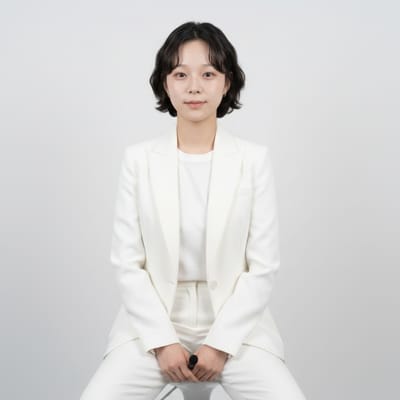
High-Key Bright Studio
An all-white, shadowless studio portrait: white backdrop, white blazer over a white shirt, you seated on a white stool, from the waist up.
Use it when
- Clean corporate sites, health and tech companies.
- A team page where everyone needs the same bright look.
- A LinkedIn photo that reads as calm and modern.
How to run it
- Upload a front-facing photo from the waist up, with no hat or sunglasses.
- Run the prompt; to keep your own top, replace the clothing sentence with 'keep the clothing from the photo'.
- For a team, run the identical prompt on each person's selfie.
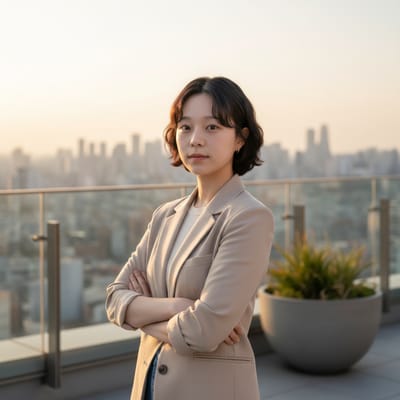
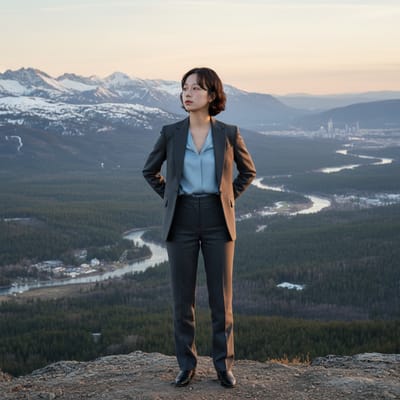
Rooftop Golden Hour
You standing on a modern rooftop at golden hour, arms crossed, city skyline in soft focus, a warm rim light on your edges, light grey or beige blazer.
Use it when
- Founder pages and investor decks.
- Real-estate and consulting profiles.
- A warmer alternative to a studio headshot.
How to run it
- Upload a standing photo, mid-thigh up.
- Name your city if you want a recognisable skyline.
- Swap 'arms crossed' for 'hands in pockets' if crossed arms feel closed off.
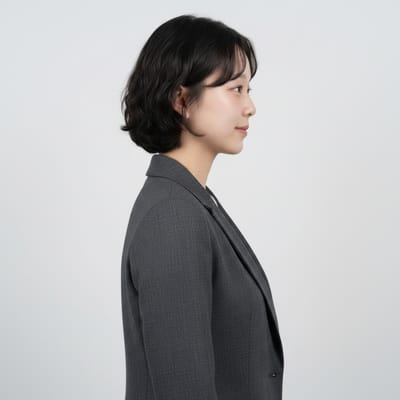
Minimalist Studio Profile
A side-profile portrait on seamless white in a tailored charcoal suit, softbox key light, no background shadows.
Use it when
- Speaker bios and conference pages.
- Author photos on a book jacket.
- A set of profile portraits that need to face the same direction.
How to run it
- Upload a photo taken from the side; a front-facing selfie gives the model too little to work with.
- Run the prompt. Change 'right side of the frame' to 'left' to flip the direction.
- Replace the suit with your own wording if you do not wear suits.
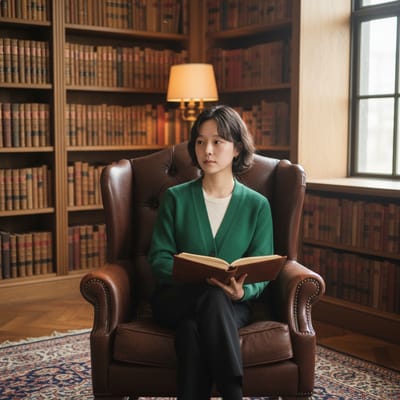
Library Thought Leader
You seated in a leather wingback chair in a private library, holding an open book, warm lamp and window light, a burgundy or forest-green cardigan or blazer.
Use it when
- Authors, advisors, academics and coaches.
- Newsletter headers and podcast artwork.
- A profile that should feel considered rather than corporate.
How to run it
- Upload a seated or relaxed photo.
- Run the prompt; replace 'open book or journal' with 'a tablet' or nothing for a modern feel.
- Pick one of the two colours in the prompt to avoid the model mixing them.
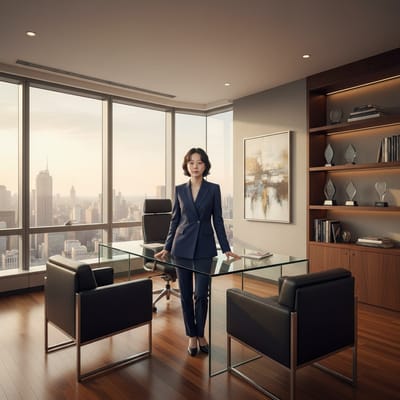
Wide-Angle Office Overview
A wide shot of you as a small but central figure in a large corner office: glass desk, skyline windows, leather chairs, awards, a navy suit.
Use it when
- Executive profiles and annual-report style imagery.
- A website hero image with room for text beside you.
- Showing scale and authority rather than a close face.
How to run it
- Upload a standing full-body photo.
- Run the prompt unchanged; the office is invented, so do not present it as your real one.
- Add 'leave empty space on the left' if you plan to overlay text.
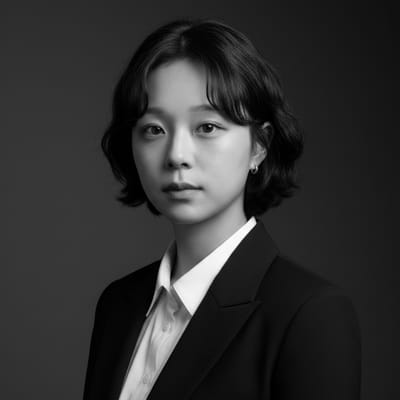
Executive Close-Up Portrait
An extreme close-up in high-contrast black and white, shoulders up, dark blazer over a white shirt, a charcoal-to-black gradient behind you, sharp eyes.
Use it when
- Press kits and keynote slides.
- A strong square avatar.
- Portraits for a leadership page with a consistent dramatic style.
How to run it
- Upload a photo where the eyes are in focus; this prompt magnifies any softness.
- Run the prompt; delete 'black and white' for a colour version with the same light.
- Crop to square for avatars; the prompt frames tight enough.
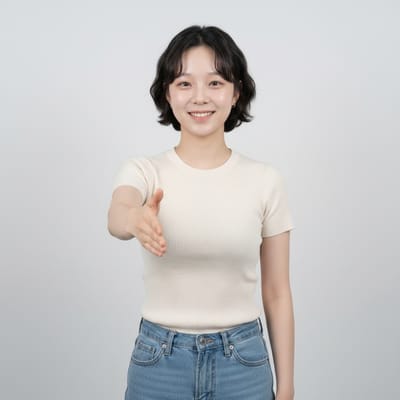
The Team Builder
You at the edge of a chair or standing, one hand extended as if welcoming or offering a handshake, an open posture and a genuine smile. Clothes and background stay as in your photo.
Use it when
- Recruiting pages and HR profiles.
- Community managers and customer-facing roles.
- A friendlier second headshot next to a formal one.
How to run it
- Upload a half-body photo with both hands visible.
- Run the prompt unchanged; it only directs body language.
- Combine with a scene prompt by pasting this text after it, minus the scene's clothing sentence.
The Global Executive
You standing straight, hands clasped behind your back, gaze slightly up and to the side, shoulders back. Clothes and background stay.
Use it when
- C-suite and strategy roles.
- A keynote speaker image.
- Board and leadership pages that want gravitas.
How to run it
- Upload a standing photo with a straight posture.
- Run the prompt unchanged.
- Add 'looking directly at the camera' if the upward gaze feels staged.
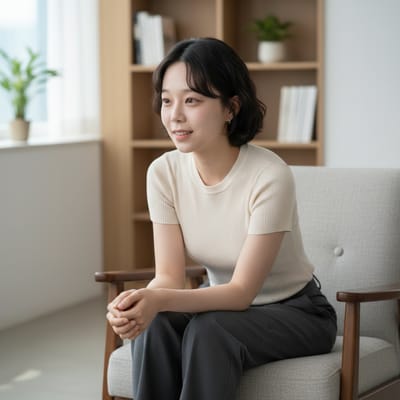
The Client-Focused Advisor
You seated, leaning slightly forward, hands loosely clasped or on the armrests, head slightly tilted, a warm professional expression. Clothes and background stay.
Use it when
- Finance, law, consulting and healthcare profiles.
- A 'book a call' page where the photo should feel attentive.
- Intake forms and onboarding emails.
How to run it
- Upload a seated photo.
- Run the prompt unchanged.
- Pair with Library Thought Leader for a matching setting: paste this pose text after that scene prompt.
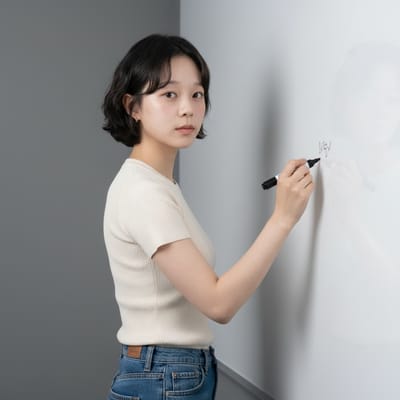
The Innovative Thinker
You beside a whiteboard or wall with one hand touching it, body at 45 degrees, head turned to the camera, a thoughtful expression. Clothes and background stay.
Use it when
- Product, design and engineering leads.
- Workshop and course landing pages.
- A 'how we work' section.
How to run it
- Upload a standing photo with one arm free.
- Run the prompt; replace 'whiteboard' with 'a wall of sticky notes' or 'a screen' to match your work.
- Keep the 45-degree line; it is what makes the pose read as mid-thought.
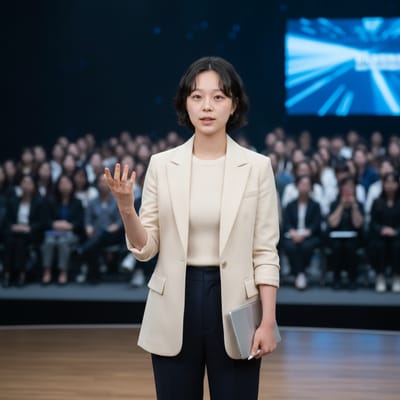
The Presentation Professional
You mid-gesture as if addressing an audience, one hand speaking, the other at your side or holding notes, body angled, head turned to the lens. Clothes and background stay.
Use it when
- Speakers, trainers and sales leads.
- Event pages and course promos.
- A webinar thumbnail.
How to run it
- Upload a standing photo with one arm free.
- Run the prompt unchanged; add 'holding a tablet' to fix the second hand.
- Pair with Rooftop Golden Hour or High-Key Bright Studio for a setting.
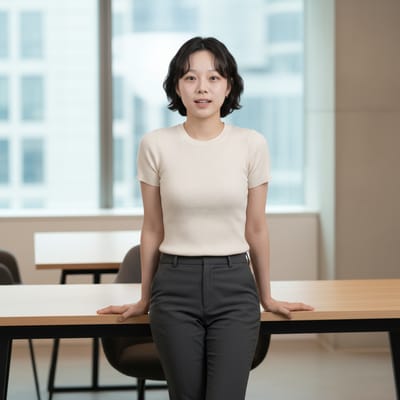
The Collaborative Leader
You leaning on the edge of a desk, arms uncrossed, hands on the surface behind you, one ankle over the other, an open expression. Clothes and background stay.
Use it when
- Team leads, agencies and studios.
- A relaxed about-page portrait.
- Culture and careers content.
How to run it
- Upload a standing, relaxed photo.
- Run the prompt unchanged.
- If no desk is in your photo, the model adds one; say 'a wooden table' or 'a kitchen counter' to control it.