What every prompt on this page produces, the situations it is for, and the exact steps to run it.
Vintage Film Base
A soft Portra-style finish: warm tones, gentle light, natural skin, a pastel background and a subtle colour shift, with film grain.
Use it when
- A first film look for a portrait.
- Softening a harsh digital photo.
- A base you can build other stock notes onto.
How to run it
- Upload a portrait in soft light.
- Run the prompt unchanged.
- Add 'keep subject unchanged, preserve composition' if the model changes anything but the colour.
Kodak Portra 400
A cinematic portrait of a young woman in an old European café, golden afternoon light through tall windows, Portra grain, warm skin, soft pastel palette, shallow bokeh.
Use it when
- An editorial-style portrait scene.
- Café and travel content.
- A reference image for a real shoot's light and colour.
How to run it
- Run as is for the scene, or upload your photo and add 'use the person in the reference photo; keep their face'.
- Replace 'young woman' and the café with your own subject and place.
- Keep 'Shot on Kodak Portra 400 film'; it sets the colour.
1970s Analog
A 1970s film look on your photo: warm faded colours, a slight vignette, analog grain, soft-focus edges, with subject and composition kept.
Use it when
- Family photos for a 'then' feel.
- Retro posters and invites.
- A warm, nostalgic feed.
How to run it
- Upload any daylight photo.
- Run the prompt unchanged; it already keeps the subject.
- Change 'Kodak Portra or Fuji' to one stock to narrow the colour.
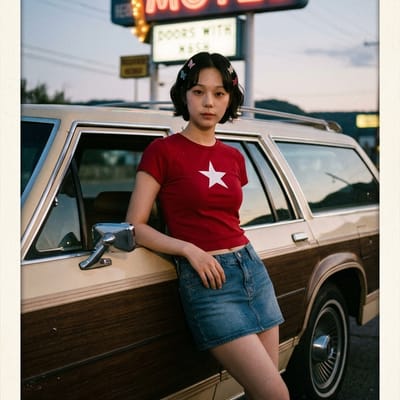
Kodachrome 64
A roadside scene from text: a family station wagon and a motel sign at dusk, Kodachrome reds and blues, slight underexposure, halation around lamps, fine grain, dust and scratches, a postcard border with a handwritten caption.
Use it when
- Road-trip and Americana posts.
- A postcard image for a travel newsletter.
- Showing what Kodachrome colour means.
How to run it
- Run without a photo.
- Replace the station wagon and motel with your own scene; keep the Kodachrome and defect lines.
- Put your caption in quotes: 'the caption reads ...'.
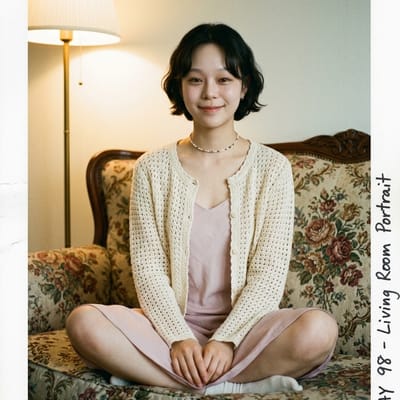
Faded Family Album
A living-room portrait from text: floral sofa, tungsten lamp, Portra tones, faded colour with a cyan shift, a matte rounded-corner print with thumb creases and archival notes.
Use it when
- 'Found photo' and family-history content.
- A nostalgic visual for a memoir or a podcast.
- Mock-ups of an album page.
How to run it
- Run without a photo, or add yours with the reference line to be in the room.
- Change 'floral sofa' and 'tungsten lamp' to your own living room.
- Keep 'matte print texture, rounded-corner photo, thumb creases' for the physical-print feel.
Polaroid SX-70
A Polaroid-style transformation of your photo: faded pastel colours, soft focus, light vignetting, grain, instant-camera nostalgia.
Use it when
- Quick 'instant photo' posts.
- Party and holiday snapshots.
- A soft, low-contrast look for a story.
How to run it
- Upload any photo.
- Run the prompt unchanged; delete 'Nano Banana AI' if you paste it elsewhere.
- Add 'with a white Polaroid frame' for the border.
Polaroid 1978 SX-70
A 1978 instant print: characteristic colour shift, a white border, soft warm light, gentle grain, slight light leaks in the corners.
Use it when
- A framed-print look for a wall or a product mock-up.
- Birthday and anniversary posts dated to the late 70s.
- A warmer Polaroid than the general prompt.
How to run it
- Upload a portrait or a snapshot.
- Run the prompt unchanged.
- Change '1978' to another year to shift the colour feel slightly.
Vintage Film Portrait
A vintage film portrait from your photo: soft grain, warm faded tones, natural skin texture, gentle shadows, a timeless analog feel.
Use it when
- Profile pictures that should not date.
- Softening skin without a beauty filter.
- A consistent portrait series.
How to run it
- Upload a portrait.
- Run the prompt unchanged; delete 'using Nano Banana AI' if you reuse the text elsewhere.
- Add 'black and white' for a monochrome version.
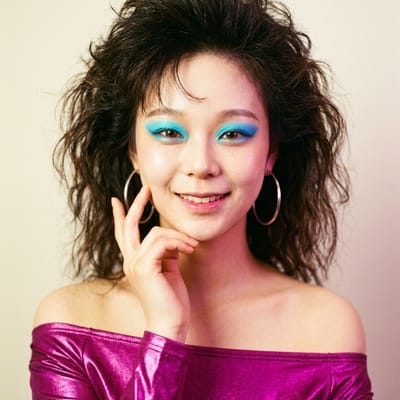
1980s Color Film
An 80s colour-film render of your photo: slight grain, a warm palette, slightly overexposed highlights, a colour shift in the shadows.
Use it when
- Bright daylight snapshots.
- Retro sports and summer posts.
- A brighter, punchier alternative to the 70s look.
How to run it
- Upload a photo with plenty of light.
- Run the prompt unchanged.
- Add 'keep subject unchanged' if it redraws anything.
90s Disposable Camera
A disposable-camera finish on your photo: harsh on-camera flash, candid framing, overexposed faces, a warm yellow-green cast, visible grain, soft focus.
Use it when
- Party and night-out photos.
- A 'no-filter' indie feel for a feed.
- Indoor group shots.
How to run it
- Upload an indoor or evening photo; flash looks wrong on bright daylight.
- Run the prompt unchanged.
- Change 'yellow-green' to 'magenta' for a different cheap-film cast.
Fujifilm Superia 400
A Superia 400 look: a slight green shift in the shadows, bright highlights, fine 35mm grain, daylight exposure, a warm stone backdrop.
Use it when
- Everyday daylight photos that should feel like film, not vintage.
- Street and architecture shots.
- A cooler counterpart to Portra.
How to run it
- Upload a daylight photo, or run without one for the stone-backdrop scene.
- Delete 'soft warm stone backdrop' to keep your own background.
- Keep 'slight green shift in shadows'; it is the Superia signature.
Cinematic 35mm
A film-still finish: 35mm grain, subtle colour shifts, soft highlight roll-off, vintage lens character, soft backlight, a teal-and-orange grade, shallow depth of field, gentle flare.
Use it when
- Backlit portraits and golden-hour photos.
- Thumbnails and posters that should look like a movie frame.
- Music and short-film promo images.
How to run it
- Upload a photo with the light behind or beside the subject.
- Run the prompt unchanged.
- Replace 'teal-and-orange' with 'muted green and amber' for a quieter grade.